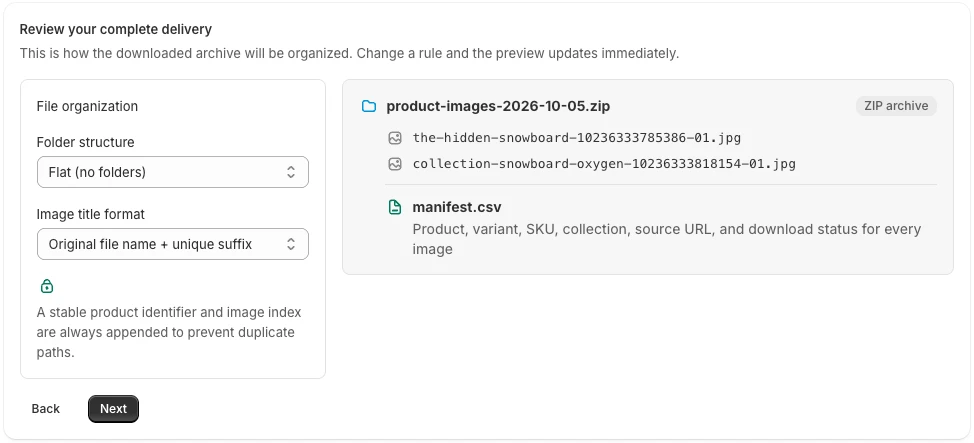
Good filenames help only after you have the right files. Compare the Shopify product image export methods if you have not settled on a download workflow. The best filename answers the question the next person will ask. A designer wants to find a product. A marketplace operator may need a SKU. Someone investigating an old export needs an identifier that still works after the product title changes.
Choose a naming rule for that job before exporting thousands of images. Renaming the whole archive later is possible, but it creates another mapping you have to maintain.
Choose the readable part of the name
| Naming basis | Useful for | Check first |
|---|---|---|
| Product handle | Recognizable catalog names | Handles can change over time |
| SKU | Channel and inventory workflows | Not every image has an associated SKU |
| Original filename | Matching existing photography records | Source names may be cryptic |
| Product title | Human browsing | Different products can have similar titles |
| Product ID | Reliable source reference | IDs are not descriptive to a recipient |
PlainKits Image Export offers these kinds of naming patterns and adds a product ID and image index to the readable base. It also normalizes characters for usable filenames.
For example, a SKU of TEE BLUE M on product 123456789 could produce tee-blue-m-123456789-01.jpg. This is an illustrative name, not a promise about the extension or index of a particular image.
Know what “original name” preserves
The original-name option uses the name taken from the source image URL as the readable base. It still normalizes the name and appends a suffix. It does not preserve the filename byte-for-byte.
The export uses the downloaded image's format; selecting a naming pattern is not an image-conversion setting. Renaming a WebP extension to .jpg after downloading will not convert the file into a JPEG.
If a receiving system requires exact filenames, try a sample and plan a controlled renaming step with an updated manifest.
Handle missing SKUs explicitly
A gallery image may have no variant association. In that case, there may be no SKU available for its filename. PlainKits falls back to the product handle for SKU naming when the SKU is missing.
That fallback keeps the file recognizable, but the recipient may still require a SKU-to-image mapping. Review the SKU download guide before promising a one-file-per-SKU delivery.
Pair names with sensible folders
A flat folder is convenient for batch uploads; product folders are easier to browse when each product has several images. Choose both together. A short filename can work inside a clearly named product folder, while a flat archive needs more context in each name.
Keep manifest.csv next to the files. Product and media IDs provide a firmer reference than trying to reconstruct relationships from a name alone. If you rename anything after exporting, keep the original-to-new filename mapping too.
Does export naming change Shopify image SEO?
No. These options change the names of downloaded copies. They do not rename hosted Shopify assets, change storefront URLs, or update alt text.
Use the export naming workflow to improve the handoff. Handle storefront image descriptions and other on-store changes separately. For the next step in a creative workflow, see sending product images to a designer.